
Some of your customers now ask ChatGPT which business to use, not just Google. Until now, a business had no say in how ChatGPT described it. On 10 November 2026, OpenAI changed that with Businesses in ChatGPT.
OpenAI says ChatGPT has 1.2 billion weekly users (OpenAI). The new tools let a business claim its profile, correct its details and see how often ChatGPT mentions it. In the US, some businesses can also put a chat agent in front of customers.
So can an Australian business use it today? Partly, depending on what kind of business you run. This guide explains what it is, where it's available as at 12 November 2026, how to claim, and what to do while it reaches more countries.
Key takeaways
- It's a business profile inside ChatGPT. Through Business Hub, a business can claim its profile, keep its details current and see how often ChatGPT mentions it.
- It launched in beta on 10 November 2026. OpenAI calls it "an early step" and plans to add more markets and business categories over time.
- Australian access is limited for now. OpenAI says eligible businesses "located where ChatGPT is available" can claim, but local stores and restaurants can currently claim only existing US listings.
- Business Agents are US only. The chat agents that answer customer questions are open to eligible US ecommerce and online service businesses.
- Claiming doesn't buy placement. OpenAI says claiming "does not guarantee higher placement or sales", and advertising doesn't change ChatGPT's own answers.
- The groundwork pays off either way. Accurate details on your website and listings help how ChatGPT describes you, whether or not you can claim yet.
What is Businesses in ChatGPT?
Businesses in ChatGPT is OpenAI's set of tools for businesses to manage how they appear in ChatGPT. OpenAI launched it in beta on 10 November 2026, and it has two parts (OpenAI):
- Business Hub. A dashboard inside ChatGPT where you claim your business, update its details and see insights. Retailers can also upload product feeds with pricing and availability.
- Business Agents. An optional chat agent that answers customer questions using your product and policy information, with guidelines you set.
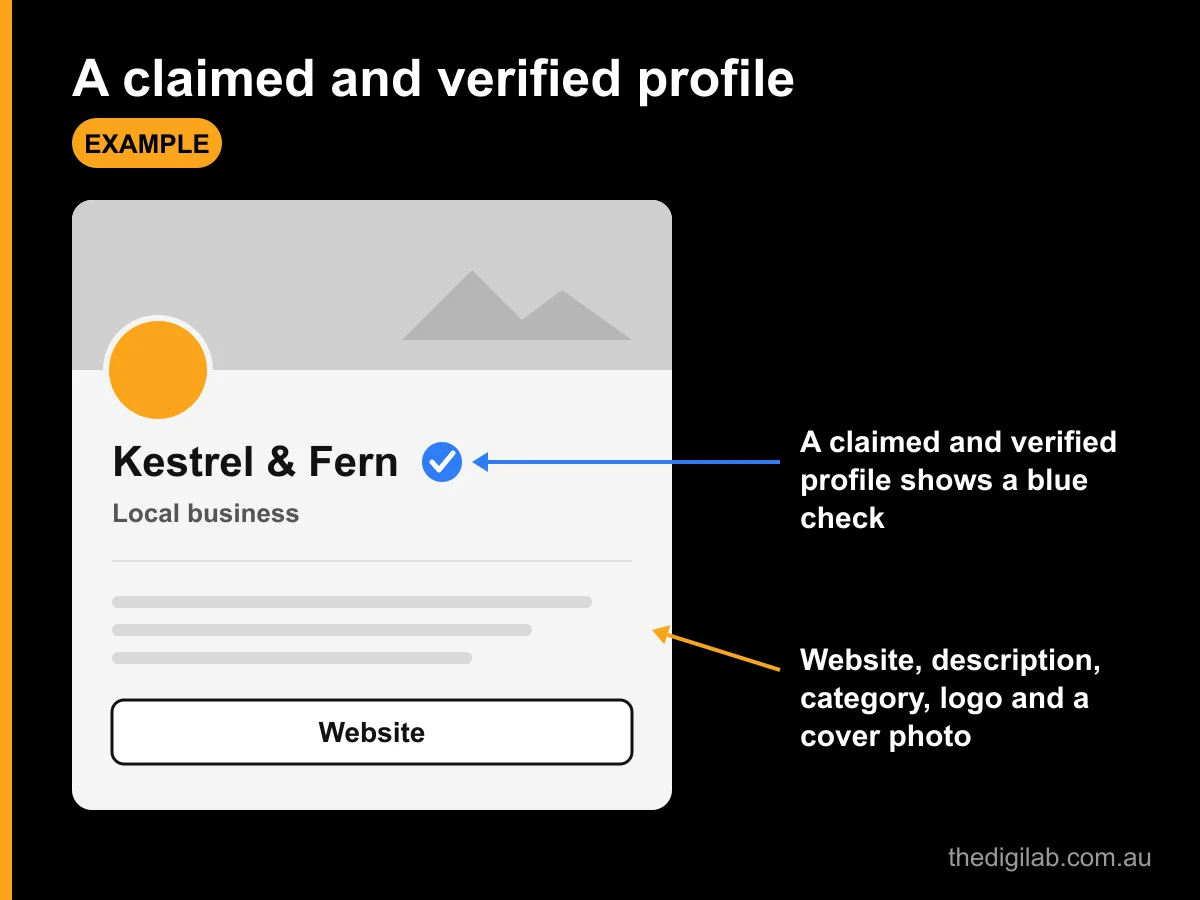
When ChatGPT mentions a business in an answer, people can click through to its ChatGPT profile. A claimed and verified profile shows a blue check (OpenAI Help).
Is it like a Google Business Profile?
In some ways. Both let you claim a listing, verify you own it and keep details like your website and description current. Neither lets you pay for better unpaid placement.
The difference is how the information is used. ChatGPT reads your details and writes its own answer, rather than showing your listing as you wrote it. OpenAI says "ChatGPT may use this information to answer customer questions" (OpenAI), and its policy says profiles may also include information from other sources (OpenAI). Our guide to how Google's AI features affect local businesses covers the same shift on Google's side.
Who can use it right now, and can Australian businesses?
Australian businesses can't use all of it yet. OpenAI says "any eligible business located where ChatGPT is available" can claim its profile, and ChatGPT is available in Australia (OpenAI). But availability "depends on the business's location and type", and the chat agents are US only (OpenAI Help).
Here's where each part stands as at 12 November 2026:
| Feature | Who can use it | Australian businesses |
|---|---|---|
| Claim and manage a profile | Eligible businesses where ChatGPT is available and verification is supported; "initially available to eligible businesses with a website" | Online businesses may be able to claim or add a profile. Local stores and restaurants "can currently claim only an existing U.S. listing". |
| Product feeds (prices and stock) | Retailers with a claimed, verified profile | Follows claiming |
| Insights (mentions, clicks, topics) | Businesses with a claimed, verified profile | Follows claiming |
| Business Agents | "Eligible ecommerce and online service businesses in the US with a website" | Not available yet |
What about service businesses like trades, clinics and law firms that serve customers locally? OpenAI hasn't said. The quickest way to find out is to open Business Hub and search for your business: it shows what you can do.
Eligibility also depends on industry. OpenAI says it may hold off on some categories "until we have the safeguards needed to support them responsibly" (OpenAI), and that "eligibility requirements may change over time".
You don't need to advertise to claim. OpenAI says "you don't need an Ads account or a ChatGPT Enterprise agreement to claim an eligible business" (OpenAI Help).
How do you claim your business in ChatGPT?
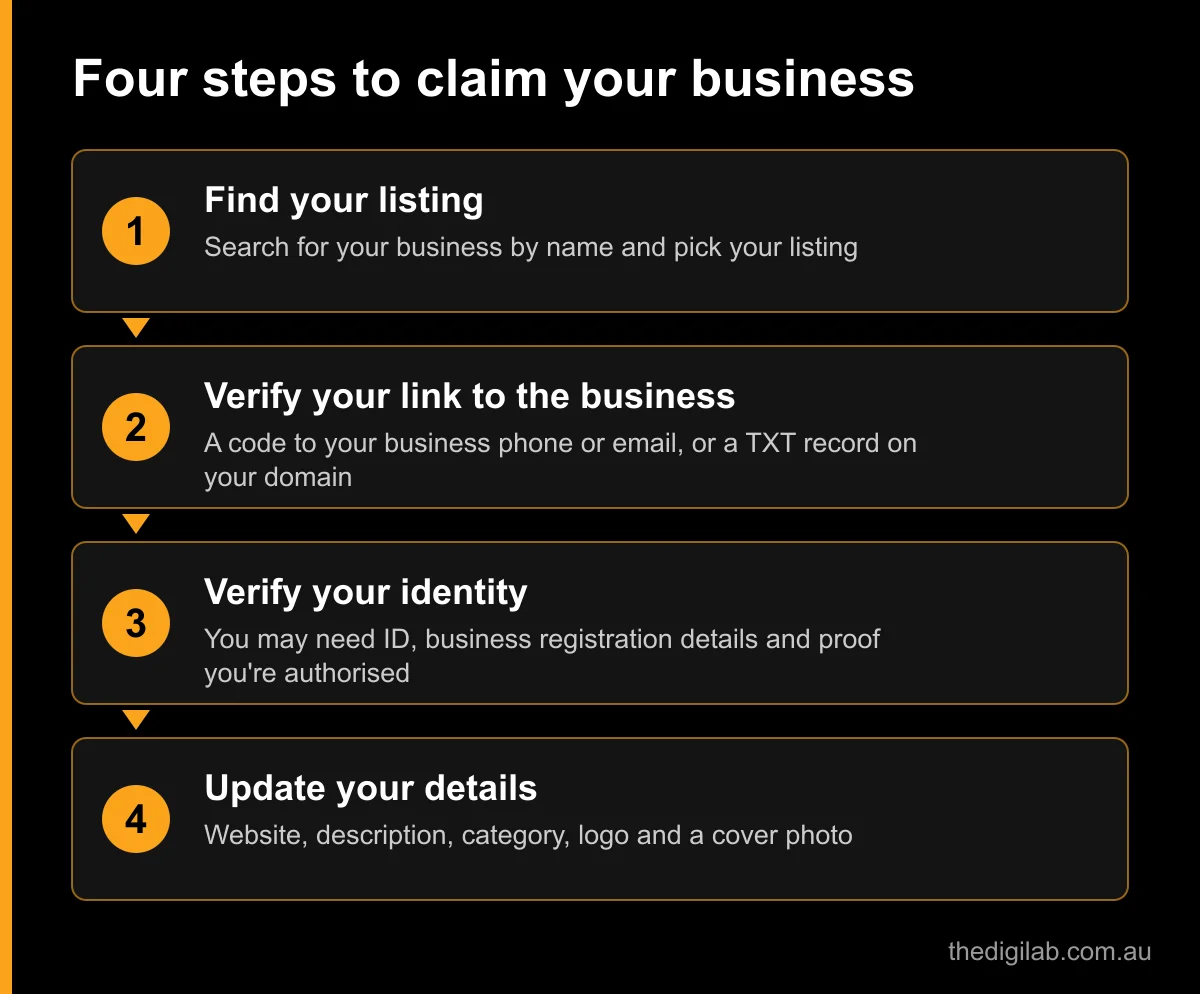
You claim it inside ChatGPT, in two checks: one proves your link to the business, the other proves who you are. OpenAI reviews both, and you can't publish changes until both are approved (OpenAI Help).
- Open Business Hub. Sign in to ChatGPT, open Business Hub from the sidebar (or go to chatgpt.com/business-hub) and search for your business by name.
- Pick your listing. Select the one that matches your business and confirm which ChatGPT account will manage it. If you run an eligible online business and can't find it, you may see an option to add it.
- Verify your link to the business. Choose one of the methods offered:
- a code by text or automated call to your business phone
- a code sent to your business email
- a TXT record added to your website domain's DNS settings
- connecting your Shopify store
- Wait for approval. OpenAI reviews the claim and emails you its decision or asks for more information.
- Verify your identity with Persona. You may need a government-issued ID, business registration details and proof you're authorised to represent the business. The blue check appears once this is approved.
- Update your details. Add or correct your website, description, category, logo, delivery and return policies, and a cover photo. OpenAI reviews changes before they show.
Two practical tips. For the domain method, you need access to your DNS settings, so ask whoever manages your domain if that isn't you. And make sure the business name, address and ABN you give match your official records: that's OpenAI's first advice when a check fails.
Once it's set up, the admin can add teammates and give an agency access to manage the business, each using their own ChatGPT account. Each brand is managed separately, and claiming the main brand doesn't claim its locations.
What do the insights show?
Insights show how often ChatGPT mentions your business and sends people to your website, over the past 28 days. They're only available after your claim and identity check are approved (OpenAI Help).
| Insight | What it counts |
|---|---|
| Mentions | Online business: each time ChatGPT references your website (your brand name alone doesn't count). Local business: each time ChatGPT shows a result for your location, even if no one opens it. |
| Website clicks | How often people click through to your website |
| Discovery topics | Common themes in ChatGPT answers that mentioned or cited your business |
You won't see what people typed. OpenAI says "businesses don't receive individual prompts or consumer conversations", and insights only appear once there's enough activity to meet a threshold. A blank figure doesn't necessarily mean zero.
Is it worth checking? Yes, if you can claim. It's the first view OpenAI itself gives of how often ChatGPT mentions a business. Put the website clicks next to the ChatGPT visits in Google Analytics to see whether those mentions turn into enquiries.
What are Business Agents?
A Business Agent is a chat assistant for your business inside ChatGPT. It answers questions using the product and policy information you give it, and a customer chooses whether to start the conversation. For now, it's only for eligible ecommerce and online service businesses in the US (OpenAI).
The chat is clearly labelled and kept separate from ChatGPT's own answers. OpenAI gives the example of someone comparing two products and asking which features fit their needs.
There are clear limits on what an agent can do (OpenAI Help):
- It can't take bookings or payments. It explains products and policies, then links to your website, where customers complete those steps.
- It must say it's AI. OpenAI's policy says an agent "must be clear that it is AI representing the business" (OpenAI).
- No pressure selling. It can't "create false urgency" or keep pushing after someone says no.
- No sensitive data. It can't ask for things like health details, government IDs or financial credentials.
US businesses can also sponsor their agent and use it as the destination for ChatGPT Ads. OpenAI says sponsored placements are labelled, and that "advertising doesn't influence ChatGPT's independent answers".
What does it mean for law firms and other professional services?
For now, a profile is the most a law firm, clinic or accountant can hope for, and even that isn't confirmed in Australia. Business Agents are for US ecommerce and online services, and OpenAI's policy rules out the core of professional advice anyway.
The Business Agents policy says an agent "must not provide users with advice that legally requires a professional license", or claim professional credentials (OpenAI). So even when agents reach more businesses, a family law firm's agent could explain its services and fees, but not answer "what am I entitled to?".
If you can claim a profile, treat it like any other advertising. OpenAI's profile policy bans "false or misleading claims about prices, availability, qualifications, or likely results" and "fabricated reviews or endorsements" (OpenAI). For Queensland firms, the same professional conduct and consumer law rules that apply to your website apply here too. Our guide to family law advertising rules in Queensland covers what you can and can't say.
What should Australian businesses do now?
Check whether you can claim, and get your details in order either way. OpenAI says ChatGPT may show information about your business whether or not you've set anything up, and profiles can draw on other sources (OpenAI).
- Search for your business in Business Hub. It takes a few minutes and shows whether you can claim, add a profile or neither. If you can't yet, check again as OpenAI expands.
- Line up your verification. Know which phone number and email ChatGPT might show for your business, who controls your domain's DNS, and that your registered name, address and ABN match.
- Make your website say plainly what you do. A clear page for each service, your areas, hours and contact details. ChatGPT can only describe what it can find.
- Keep your details the same everywhere. Use the same business name, address and phone number on your website, Google Business Profile and directory listings. Our guide to local SEO in Brisbane and the Gold Coast covers the listings that matter.
- Make sure your site can be found at all. If search engines can't index your pages, AI tools that search the web will struggle too. Our guide to why a website doesn't show on Google walks through the checks.
- Watch for ChatGPT visits. In Google Analytics, look for chatgpt.com in your referral traffic, so you have a baseline before you claim.
What shouldn't you pay for?
Be wary of anyone selling "guaranteed" ChatGPT placement. OpenAI says "claiming does not guarantee higher placement or sales" and that ChatGPT "continues to make independent recommendations and comparisons" (OpenAI). Claiming your business is something you can do yourself.
Frequently asked questions
It's OpenAI's set of tools for businesses, launched in beta on 10 November 2026. Through Business Hub, a business can claim its ChatGPT profile, update its details, add product feeds and see insights like mentions and website clicks. Eligible US businesses can also publish a Business Agent that answers customer questions.
Some can. OpenAI says eligible businesses where ChatGPT is available can claim, but availability depends on location and type. Local stores and restaurants can currently claim only existing US listings, and Business Agents are US only. Search for your business in Business Hub to see your options.
OpenAI says you don't need an Ads account or a ChatGPT Enterprise agreement to claim an eligible business. You do need a ChatGPT account, a way to verify your link to the business (phone, email, domain or Shopify) and an identity check through Persona.
Not on its own. OpenAI says claiming "does not guarantee higher placement or sales" and that advertising doesn't influence ChatGPT's independent answers. Claiming lets you correct your details and see insights. Clear, consistent information on your website and listings is what helps ChatGPT describe you accurately.
Not yet. OpenAI says the current agent explains products and policies and links to your website, where customers book or buy. Agents are only available to eligible ecommerce and online service businesses in the US, and they can't give advice that needs a professional licence.
Where to start
Spend ten minutes this week: open Business Hub, search for your business and see what it lets you do. If you can claim, line up your verification and claim it. If you can't yet, make sure your website and listings describe your business clearly and consistently, because that's what ChatGPT reads in the meantime.
Want help getting your business found on Google and in AI search? See our SEO service or get in touch.